How to write test cases, with AI doing the first draft
Here is how to write test cases: give each one an ID, the role and device it runs on, user-action steps and expected results, including one thing that must not happen. An AI agent can draft the first version from the running app, and a QA engineer reviews it. This post shows the fields, a real test case, and where the review pays off.
Our test cases feed automated regression testing for web apps: each one becomes a Playwright test file.
What is a test case?
A test case is one checked behavior of an app: a starting state, actions and an expected result. The International Software Testing Qualifications Board (ISTQB) defines it as a set of preconditions, inputs, actions, expected results and postconditions (ISTQB glossary, "test case"). The standard ISO/IEC/IEEE 29119-3 lists the fields of test documentation (ISO/IEC/IEEE 29119-3).
A test scenario is the broader story, such as "a user manages time entries". One scenario holds many test cases. "A user edits an entry and the total updates" is a test case. Write the scenario first if it helps you find the cases, then work from the cases. The cases are what you run.
Why do test cases matter?
A test case gives a team three things. It is a shared definition of "works": the developer, the tester and the client read the same sentence. It is a repeatable check, so the second run does the same as the first. And it is the base for automation, because an agent or a script can only repeat what someone wrote down.
How to write test cases, step by step
To write a test case, work through eight short steps, from naming one behavior to writing the cleanup. Each step is one action. Each names the mistake that ruins it, so you can check your own draft against the list before anyone runs it.
How do I create a test case?
- Name the behavior in one line. Give it an ID and a title such as "Team membership controls which customers and projects a member sees". If the title needs "and", you have two test cases.
- Write a user story. One sentence: "As a Super admin, I want team-restricted visibility, so that members see only their data." Without a role, nobody knows who is logged in.
- List the starting state. Name the data and the account the test needs. "Some customer" is not data. Write "a customer and project assigned to one team only".
- Write the steps as user actions. Number them. "Assign the customer to the team" is an action. "Teams work" is a wish.
- State what you expect. Write each expected result as a check that is true or false. "Works correctly" cannot fail.
- Add one absence check. Write what must not be visible or possible. This is the line most teams skip.
- Name the roles and devices. List every role and device the test case runs on. A pass for an admin on a laptop says nothing about a regular user on a phone.
- Write the cleanup. Say what the test deletes or resets. Without it, the next run starts on dirty data.
The sections below explain steps 2 to 7 and show them in one real file.
What fields does every test case need?
Classic test case templates list ID, title, preconditions, steps, test data, expected result and status. They leave out what an automated run needs: who runs the test, on which device, and how important it is. The table maps each classic field to our format.
| Classic field | Field in our format | What changes |
|---|---|---|
| ID, title | Heading: ID and a one-line behavior | The title states one behavior |
| (none) | Priority P0 to P3, Type, Feature | Sorting by risk and by area |
| (none) | Projects | The roles and devices the test runs on |
| Preconditions, test data | How to build: Arrange | Data is named, not implied |
| Steps | How to build: Act | Numbered user actions |
| Expected result | Acceptance criteria: Assert | Checkboxes, each true or false |
| (none) | Absence check items | What must not appear or happen |
| Status | Tracked outside the file | The run report holds it, so the file stays a specification |
| (none) | Parent, Relates to, Blocked by | Links between test cases |
How to write test cases with an example
A good example is one behavior, one role, user-action steps and checks that can fail. The two top-ranking guides that show an example both use a happy-path login. This one is a real file from the Kimai suite we ran in the measured run: Kimai 2.67.0, an open-source time-tracking app.
How do you write a test case example?
Here is TC-WEB-027, quoted from the file (the run notes under each criterion are left out):
## TC-WEB-027 - Super admin sees only own entries, not other users' entries

**Priority:** P1
**Tier:** Interaction-level
**Type:** Functional, Negative
**Estimated Time:** 6
**Feature:** Timesheet
**Projects:** super-admin-desktop-chrome, super-admin-iphone-13
**Test file:** Tests/super-admin/TC-WEB-027.spec.ts

### Parent

TC-WEB-005

### What to build

As a Super admin, I want my timesheet to show my own entries, so that the personal list is not mixed with team time (J3).

### How to build

**Arrange:**
- One own entry and one entry of the User role, each with a unique description (the User entry is created in the helper context).
- Account language is German; assert messages by meaning, not by an English literal.

**Act:**
1. Create the entries.
2. Open the timesheet list as Super admin.
3. Search for the User entry description.

**Cleanup:** Delete both entries.

**Test file rules:**
- Write exactly one file at `Tests/super-admin/TC-WEB-027.spec.ts`. Every test in it belongs to this test case, and every test title starts with `TC-WEB-027: `.
- Line 1 of the file is the comment named in the acceptance criteria's `Output test file contains comment` item.
- The Playwright project supplies the browser or device: never set a viewport, user agent, or device in the test.
- Session: Starts logged in as Super admin: the project injects the session. Do not log in through the UI.
- The User steps run in a second browser context: `const helper = await browser.newContext({ storageState: '.auth/user.json' })`, closed at the end of the test.
- Do not edit the Playwright config or other test cases' test files.

### Acceptance criteria

**Assert:**

- [x] The Super admin entry is listed
- [x] The control set (create, export, batch, row actions) is present
- [x] Absence check: The User entry is not listed, also not via search
- [x] Output test file contains comment: `// TC-WEB-027 criteria-hash: fa6fc696` as its first line
The notes, part by part:
- Heading. One behavior and an ID that the test file reuses.
- Fields. Priority and Type sort the work. Projects names the two role and device runs.
- User story. It names the role and the reason: the personal list must not mix with team time.
- Arrange. Two entries with unique descriptions, so the test finds exactly them. The second entry belongs to another role.
- Act. Three user actions. The third searches for the other user's entry, which makes the absence check a real attempt to find it.
- Cleanup. The test deletes both entries.
- Test file rules. One file, one title prefix, and the project supplies the device.
- Assert. Two positive checks and one absence check.
The Playwright file next to it creates the two entries, runs the checks and deletes them at the end.
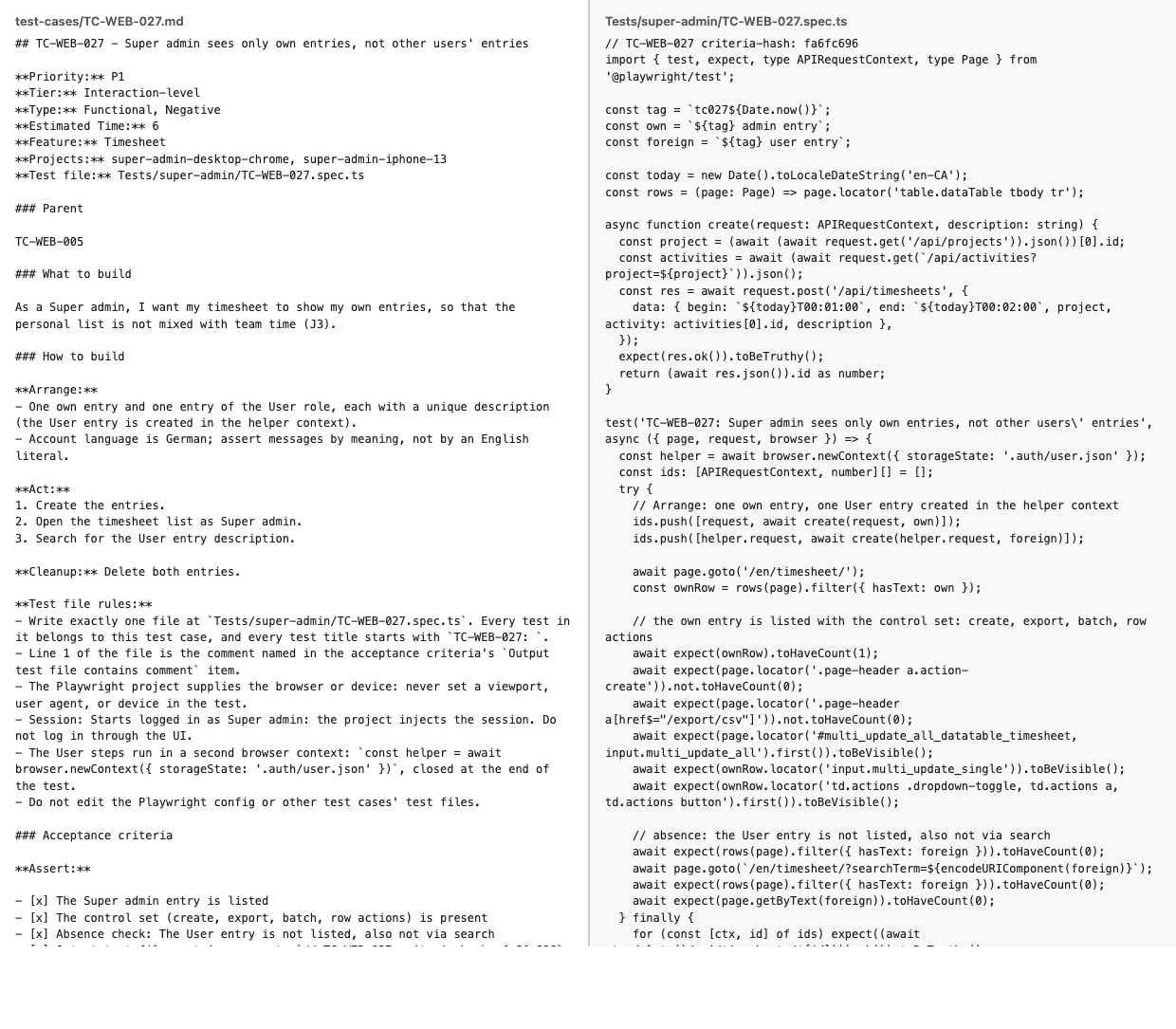
The full run is in the measured run on Kimai, with the full numbers.
How do you write a test case from the user's perspective, per role and device?
Write every test case from one user's point of view. The user story at the top does this job: "As a
The steps stay on the user's side of the screen. Write "open the timesheet list" and leave "call the endpoint" out of the steps. If an agent later automates the test case, it clicks what the user clicks.
Then add the device. The Projects field lists the role and device pairs a test case needs. For Kimai we ran three roles (super admin, regular user and no login) on two devices (Desktop Chrome and an iPhone 13), which makes six Playwright projects, as described in the Playwright documentation on projects. TC-WEB-027 needs two of the six, both super admin.
The same page behaves differently per role and device. An admin sees a button that the regular user never gets. A phone hides a column that the laptop shows. A test case that skips this field tests one situation and implies all six.
What is an absence check, and what must not happen?
An absence check asserts that something does not appear or does not happen. "The User entry is not listed, also not via search" is one. So is "After logout, the browser back button does not show protected page content".
A test case often checks only that the good thing happens. Such a test stays green when the app shows too much. A permission bug looks exactly like that: the right user sees the right data, and the wrong user sees it as well. Only an absence check catches the second half. The 350 test cases from one crawl of Kimai use this format.
A sound absence check finds real defects. TC-WEB-001 (role User) and TC-WEB-002 (role Super admin) carry the Back-button check above. The redirect check passed. The absence check failed on both projects: after Back, the avatar menu was still on the page. Kimai sends Cache-Control: max-age=0, must-revalidate, private on the dashboard without no-store, so the browser shows the cached page after logout. The agent left the criterion unticked and blocked the case, because the defect sits in Kimai.
An absence check also goes wrong in two ways. The first is vagueness: "nothing bad happens" cannot fail, so name the thing that must be absent. The second is a check that passes whatever the app does. TC-WEB-007 asserts "The report shows no other user's data", but its Arrange creates only the user's own entry and no step asks for another user's data. The check cannot go red. The review of the backlog flagged it. A weak absence check looks like coverage and is none.
What are the common mistakes when you write test cases?
Five mistakes come up again and again:
- Only a happy path. The test checks that the right thing works and never that the wrong thing is refused.
- No role or device. The test case runs on one account and one screen, and the report says "passed" for all.
- No absence check. A permission bug passes every positive check.
- Steps that are not user actions. "The API returns 200" is not something a user does, and an agent cannot click it.
- Side effects nobody foresaw. TC-WEB-170 chooses list columns on the phone. Switching to the mobile profile makes Kimai post the form and reload the page, which closes the dialog, so a click before the reload landed on nothing. The first run showed it, and both the test and the test case's implementation note were updated. Plan for that second edit.
How do you let AI write the first draft, then review it?
AI writes a useful first draft when it can see the app, and a poor one when it guesses. The order is: crawl the app, write a spec, draft the test cases, review them, then write the tests. Who does the work, an agent, a team or an outsourced one, changes the cost, not the order: see what outsourcing QA costs compared with automating it.
In the measured run, crawl, spec, drafting, review and fixes took about 91 minutes of agent time, plus about 20 minutes of human prompting and review. The figures come from the Kimai run report. They are measured on one app, and the human column is a model estimate.
What does the AI need first: a crawl and a spec of the app?
The agent needs a map before it writes a line. We crawled the app once and produced a spec of pages, forms and journeys, in about 10 minutes. The test cases came from the spec instead of the agent's idea of what a time-tracking app does. That is the same idea behind QA automation with AI agents: the agent reads the real app, and a person checks the result.
What do you check in the draft: gaps and overlap?
The agent drafted 212 test cases first. The review against the spec and the app code took about 1 hour, the fixes about 13 minutes, and the backlog ended at 350 test cases. The 138 added test cases were missing test cases: coverage the first draft left out.
We counted the kinds of change in the review of an earlier backlog of 111 test cases. It produced 282 distinct findings. Of those, 138 were labelled "missing test case", most of them permission checks such as the User role denied on a route. The next groups were wrong expectations (8), hedged asserts (7) and contradictions with the app code (7). The count is by label, and a finding with another label may also call for a new test case. A draft covers what the app shows and tends to miss what the app must refuse. Read it for two things:
- Gaps. Which roles and refusals have no test case?
- Overlap. Which two test cases check the same thing?
What do you check in the criteria: the ones the app cannot meet?
Some criteria the app cannot meet, because the app does something else. TC-WEB-001 is one: its Back-button check failed on a real defect, and the case stayed blocked for a human decision. Read each criterion against the app code and ask whether the app can pass it at all.
Some teams should not let AI write the first draft. A team with no running app to crawl gives the agent nothing to read. A domain whose rules the screen does not show, such as pricing logic in the back end or terms in a contract, will not come out of a crawl. Write those test cases yourself from the rules.
Is there any tool to write test cases?
Yes, in two kinds. Test management tools store test cases and track their runs. They hold the test cases you write, and the writing stays with you.
Agent skills draft the test cases from the app. qa-signoff is a pack of such skills. The free pack crawls your app, writes a spec and drafts test cases in the format above, and it is Apache-2.0 on GitHub. It is a free AI test case generator: it drafts, and you review.
How to write test cases in Playwright
To write test cases for Playwright, keep one test file per test case and name the file after the test case ID. The test case lists the Playwright projects it needs, and Playwright runs the file once per project. In the measured run we used Playwright 1.49.0. The file holds no viewport or device setting.
- Name the file after the ID. TC-WEB-027 becomes
Tests/super-admin/TC-WEB-027.spec.ts. If two test cases share a file, a red test no longer points to one of them. - Start every test title with the ID.
TC-WEB-027: ...keeps the report searchable. A title without the ID is lost in the list of 350. - Turn each criterion into one check. The Assert list becomes expectations in order. A criterion that no expectation covers is a test that never fails.
- Leave the device to the project. The test sets no viewport or user agent. A device hard-coded in the test overrides the project and runs one situation twice.
- Write the cleanup into the test. The test deletes what it created. Skipped cleanup leaves entries that break the next run.
A red test names its test case, and a test case names its test file. How does an agent turn the file into a test? How AI agents turn test cases into Playwright tests describes the step. The short version: it reads Arrange, Act and Assert, and writes one check per criterion.
How do you manage test cases as the app changes?
Keep one file per test case in the repository, next to the tests. A parent test case groups the ones that belong together, Relates to links the neighbors, and Blocked by names what must work first. When the app changes, you edit the files that the change touches and rewrite only their tests. The run report holds the status, so the file stays a specification.
Teams that work in Jira or Azure DevOps keep a work item per test case, or a file per test case in the repo, linked from the work item. Either way, one ID per test case holds the thread. If you ask how to write test cases in Jira, this is the answer: the ID connects the work item, the file and the test.
A suite that changes with the app is the point of a regression suite that runs on every release.
How do test cases serve acceptance testing?
Acceptance testing uses the same format with a different reader. The user story names the client or the business owner, and the expected results are the agreed requirements. The test cases then double as the list a client signs off. For the plan around them, see a UAT plan template for client projects.
FAQ
What is the difference between a test case and a test scenario?
A test scenario is a story of what a user wants to do, such as "manage time entries". A test case is one concrete check inside it, with a starting state, steps and an expected result. One scenario holds many test cases. You run test cases, and you use scenarios to find them. The ISTQB glossary has no entry for test scenario, so teams define the term themselves.
How many test cases should I write for a feature?
Write one per rule and one per refusal. A feature with two rules and two things it must deny needs four test cases, plus one run per extra role or device that behaves differently. There is no fixed number. Our Kimai suite has 350 test cases for the whole app. Start with the behaviors that, if broken, stop a user from working, and add the refusals next.
How detailed should a test case be?
Detailed enough that someone who has never seen the app can run it, and short enough to check one thing. TC-WEB-027 has three steps and three checks. If a test case needs fifteen steps, split it. If a step says "check the page", name what to check. A reader should not have to guess the value, the button or the role.
Let an agent write your first draft: the free qa-signoff pack, Apache-2.0, on GitHub.
Get the free pack